
An event planning form is a structured document that captures every critical detail needed to plan, organise, and execute a successful event, from guest counts and budgets to vendor contacts and task deadlines. In Indian event management, where a Bangalore wedding can involve 500 guests, 30 vendors, and a three-day programme, this single document is the difference between controlled execution and complete chaos. Whether you work in Excel, Google Sheets, or Notion, the right event planning document keeps your entire team aligned and accountable. This guide breaks down what goes inside one, how to choose the right template, and how to avoid the mistakes that derail even experienced organisers.
What are the essential components of an event planning form?
A well-built event planning form is not a single page. Top templates feature 15 to 20 interlinked tabs covering everything from vendor research to seating plans. Each tab serves a specific function, and together they create one master document your entire team can trust.
The core sections every form must include are:
- Task and timeline tracker. Lists every task, assigns a responsible person, sets a deadline, and tracks completion status. Pre-filled tasks in professional templates include venue booking and AV requirements, entertainment confirmation, and guest list management.
- Budget monitor. Tracks planned versus actual expenditure for every line item. Real-time budget comparison prevents overspending and supports cash flow management across multi-day events.
- Guest and attendee database. Captures names, contact details, RSVP status, dietary requirements, and seating assignments.
- Venue and vendor details. Records contact names, contract terms, payment schedules, and delivery timelines for every supplier.
- Logistics summary. Confirms event dates, venue address, headcount, and access timings in one visible location.
Here is how a typical event planning form structure looks across event types:
| Section | Corporate event | Wedding | College festival |
|---|---|---|---|
| Task tracker | AV setup, delegate packs | Décor, catering, rituals | Stage, sponsorship, passes |
| Budget monitor | Per-head cost, AV spend | Catering, florals, venue | Sponsorship income vs. spend |
| Guest database | Delegate list, dietary needs | Family seating, RSVP | Ticket holders, VIP list |
| Vendor details | AV company, caterer | Photographer, mehendi artist | Sound company, food stalls |
| Logistics | Conference room layout | Mandap placement, timing | Stage plot, crowd flow |
Capturing firm event dates and guest counts early is not optional. These logistics form the foundation of every downstream decision, from venue capacity to catering quantities.
How do you choose the right event planning form template?
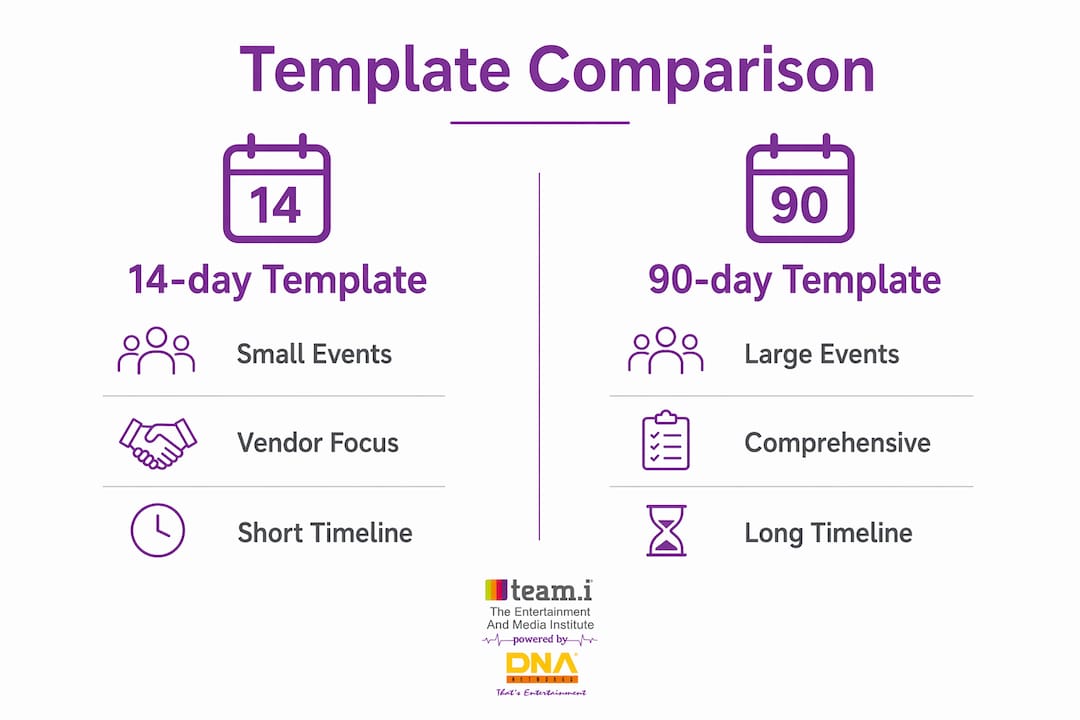
Template selection depends on your event’s scale and lead time. Industry-standard planning templates offer three primary time-based frameworks: 14-day, 90-day, and 6-plus month planning cycles, each available in Excel, Google Sheets, and PDF formats.
| Timeline | Best suited for | Key focus areas |
|---|---|---|
| 14-day template | Small corporate meetings, birthday functions | Vendor confirmation, guest comms, day-of logistics |
| 90-day template | Mid-scale weddings, college festivals, product launches | Budget phasing, vendor contracts, marketing |
| 6+ month template | Large concerts, destination weddings, trade expos | Venue booking, sponsorship, multi-team coordination |
For Indian events specifically, template choice must account for local complexity. A Mumbai corporate awards night at a hotel like the Taj Lands End needs a vendor section that tracks AV companies, décor suppliers, and live entertainment separately. A Hyderabad tech conference with 1,000 delegates needs a delegate management tab with dietary preferences mapped to table assignments. A Delhi wedding with a three-day programme needs a day-by-day timeline tab for each function.
Google Sheets works particularly well for Indian event teams because live collaboration reduces data errors and gives everyone one source of truth, regardless of whether your team is split between Bangalore and Mumbai. Notion offers a more visual layout for planners who prefer database-style organisation. Excel remains the standard for finance-heavy events where budget formulas need to run across complex cost structures.
Pro Tip: Lock the master version of your event planning form template and share a view-only link with clients. Give edit access only to your core team. This prevents accidental overwrites during high-pressure execution days.

Step-by-step process for filling out an event planning form
Filling out a form correctly from the start saves you from firefighting later. Follow this sequence every time:
- Lock the fundamentals first. Before touching any other section, confirm your event date, venue, total budget, and expected guest count. These logistics form the foundation of the entire planning lifecycle. Without them, every other section is guesswork.
- Build your task list with deadlines and owners. Every task needs three things: what it is, when it must be done, and who owns it. For a corporate event in Hyderabad, “Book AV company” is not a task. “Book AV company by 15 August, owned by Priya, status: in progress” is a task.
- Input your full budget with planned figures. Enter every anticipated cost before you spend a rupee. Then update actual figures as invoices arrive. Tracking payment status alongside costs is the only way to manage cash flow on events where vendors expect advances weeks before the event date.
- Populate your guest database completely. Add names, contact numbers, RSVP status, and any special requirements. For weddings in Bangalore, this section often runs to hundreds of rows. Keeping it current means your caterer and seating team always have accurate numbers.
- Fill in venue and vendor details as contracts are signed. Do not wait until event week. Log contact names, mobile numbers, contract values, and delivery timelines the moment each agreement is confirmed.
- Mark non-applicable sections as ‘N/A’, never leave them blank. Blank fields create confusion during stakeholder reviews and make it look like the section was forgotten rather than intentionally excluded.
- Share the document with your full team and set a review cadence. Weekly check-ins against the form keep everyone aligned. For large-scale events, daily updates in the final two weeks are standard practice.
Pro Tip: Use a colour-coded status column in your task tracker: red for overdue, amber for in progress, green for complete. At a glance, you and your client can see exactly where the event stands without reading every row.
Common mistakes when working with event planning forms
Even experienced planners make avoidable errors with their event planning documents. Knowing what they are means you do not repeat them.
- Leaving sections blank. A blank field looks like an oversight. Marking it ‘N/A’ tells every reviewer that the section was considered and consciously excluded.
- No task prioritisation by deadline. Not all tasks carry equal urgency. Venue booking for a Mumbai event six months out is more critical than finalising the menu. Failing to rank by deadline leads to last-minute scrambling on the tasks that actually matter.
- Ignoring the planned-versus-actual budget column. Many planners fill in planned costs and never update actuals. This is how events go over budget without anyone noticing until it is too late.
- Outdated guest lists. RSVPs change. Dietary requirements get added. If your guest database is not updated within 48 hours of each change, your caterer and venue team are working from wrong numbers.
- No post-event reflection section. Adding a dedicated evaluation section to your template is what separates planners who improve from planners who repeat the same mistakes.
The difference between a chaotic event and a smooth one is not talent. It is whether your team is reacting to noise or prioritising tasks by deadlines and dependencies.
What Teami has learnt from years of event planning on the ground
After working across weddings in Bangalore, corporate summits in Hyderabad, and college festivals across South India, one pattern is consistent: the planners who struggle are the ones treating their event planning form as a one-time setup document rather than a living operational tool.
Grouping tasks by time phases, such as 90 days out, 60 days out, and 30 days out, is far more effective than organising by category. It forces your team to confront what is actually urgent right now, not just what feels important. Clear accountability matters just as much. When two people share ownership of a task, nobody owns it. Every row in your form needs one name against it.
The other thing we have seen consistently: static spreadsheets without real-time tracking create a false sense of control. You think you are on budget until you are not. Collaborative digital tools with live updates remove that blind spot entirely. And always build a post-event review tab into your form from day one. The notes you write the morning after an event are the most valuable planning resource you have for the next one.
— Teami
Take your event planning skills further with Teami
Understanding how to use an event planning form is one skill. Knowing how to apply it across weddings, corporate events, concerts, and large-scale productions in real Indian contexts is another level entirely. Teami’s event management courses are built around exactly that kind of practical, on-ground training. With 23 years of industry experience and direct partnerships with DNA Entertainment Networks, Teami prepares you to work with real forms, real vendors, and real events from day one. Explore the online event management programme to see how structured training turns planning knowledge into professional confidence.
FAQ
What is an event planning form used for?
An event planning form is a centralised document that captures all critical event data including tasks, timelines, budgets, guest lists, and vendor details. It keeps every team member aligned and creates a single source of truth throughout the event lifecycle.
How many sections should an event planning form include?
Comprehensive event planning templates typically feature 15 to 20 interlinked sections, covering everything from task tracking and budget monitoring to seating plans and vendor contracts.
What is the difference between a 14-day and a 90-day event planning template?
A 14-day template suits small, short-turnaround events like corporate meetings or birthday functions, focusing on vendor confirmation and day-of logistics. A 90-day template is designed for mid-scale events such as weddings or product launches, with phased budget management and contract timelines built in.
Should I use Google Sheets or Excel for my event planning document?
Google Sheets is better for teams working across multiple cities, as live collaboration reduces errors and keeps everyone on one updated version. Excel suits finance-heavy events where complex budget formulas are required.
What happens if I leave sections blank in my event planning form?
Blank fields create confusion during stakeholder reviews and suggest the section was overlooked. Marking non-applicable sections as ‘N/A’ maintains a professional audit trail and communicates clearly that the section was considered.